In today’s dynamic business environment, marked by constant change and the evolution of information technologies, companies are increasingly considering open source alternatives for their data warehouses (DWH). This strategy has become a key factor in successful business processes, enabling companies to enhance flexibility, reduce costs, and avoid vendor dependencies.

Why are open source alternatives for DWH components becoming even more popular?
- Saving money. One big reason is cutting costs on licenses and vendor support. Open source alternatives often offer the same or even more features without extra expenses.
- Flexibility and independence. Open source solutions let companies avoid being tied to specific vendors and allow them to manage their own infrastructure.
- Active communities. Open source solutions are often supported by active communities, ensuring quick responses to changes and bug fixes.
- Suitable for different companies. Open source alternatives work well for both large corporations and smaller enterprises, including startups.
It’s important to note that there are many open source solutions for DWH with varying levels of maturity, catering to different needs. This complexity makes it challenging for a company looking to switch to open source: which software to choose? In this article, we’ll help you find answers to this question and uncover the pitfalls of this process.
Model DWH architecture
To successfully migrate to open source alternatives for DWHs, it is essential to understand the typical architecture of a DWH and how open source solutions can integrate into it. The key components of a DWH that we will delve into in this article include:
- DWH. This serves as the central repository where data is stored and processed for analysis.
- ETL (Extract, Transform, Load). This component is responsible for extracting data from various sources, transforming it, and loading it into the DWH.
- DQ (Data Quality). This component ensures the control and maintenance of data quality.
- BI (Business Intelligence). Platforms that allow visually representing data, deriving insights, and generating reports based on them.
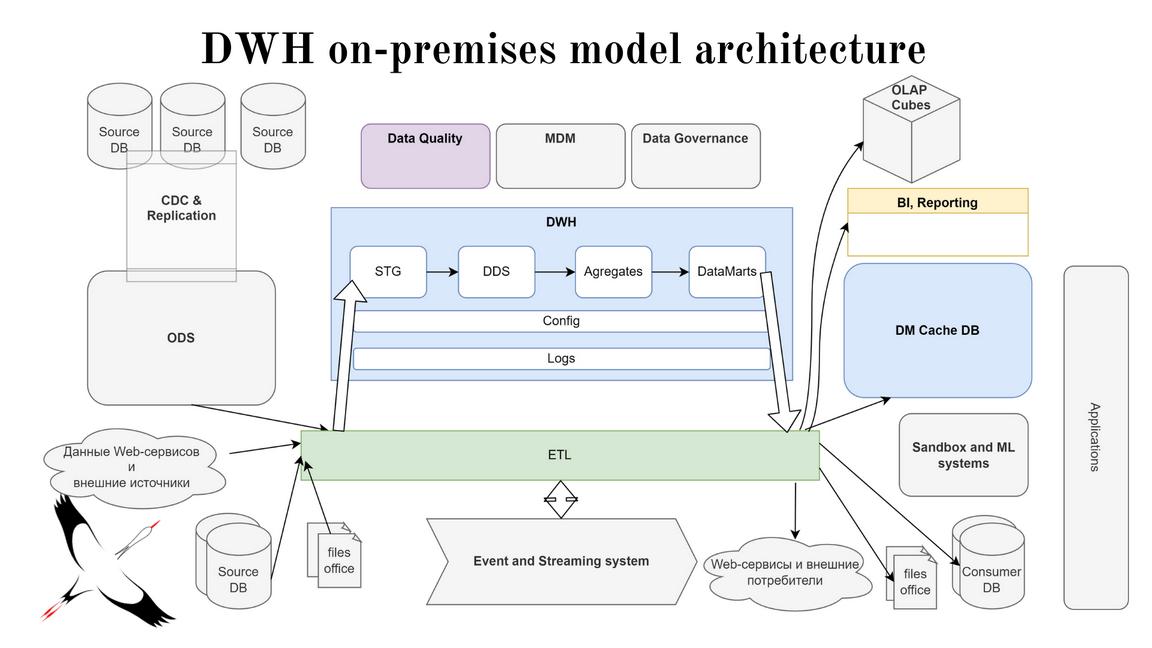
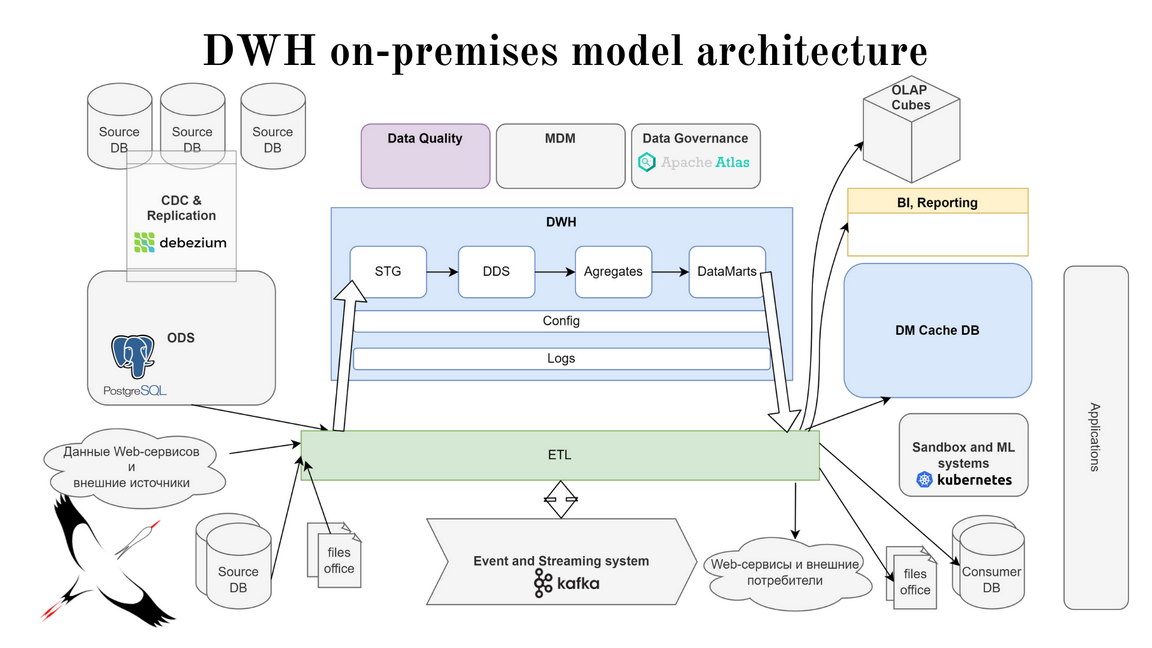
Nuances of migration and selection of open source solutions for key components.
DWH.
In this domain, leaders have also been clearly defined, each occupying its own niche: Greenplum, ClickHouse, Hadoop, and PostgreSQL.
- A classic MPP database. MPP databases handle large volumes of data processing more easily but require strict data typing and structuring. They typically support data processing only through SQL queries. Suitable for companies with a significant volume of data and transformations, dealing with complex analytical queries. However, processing a large number of small transactions is its weak point.
- A columnar RDB. Such databases excel in continuously adding data while concurrently serving analytical queries. They use “wide” tables to avoid heavy joins and can utilize SQL with additional functions. Suitable for companies that need to load all their transactional data without transformations and without connections to other sources, allowing them to build analytics and enable users to analyze this data.
- Cluster organization systems for distributed applications. In this case, file-level transformations are possible without strict data typing and structuring. This option suits companies with complex transformation logics, anticipating the processing of significant volumes of unstructured data, and where there is no understanding of the types of transformations that will be used in the future.
PostgreSQL. A classic transactional (OLTP) database. Easily handles row-level data manipulations but struggles with analytical queries on large data volumes. Suitable for small companies or small segments of analytical solutions where transactional activity needs to be maintained with a not excessively large data volume, and complex analytical queries are not anticipated.

ETL.
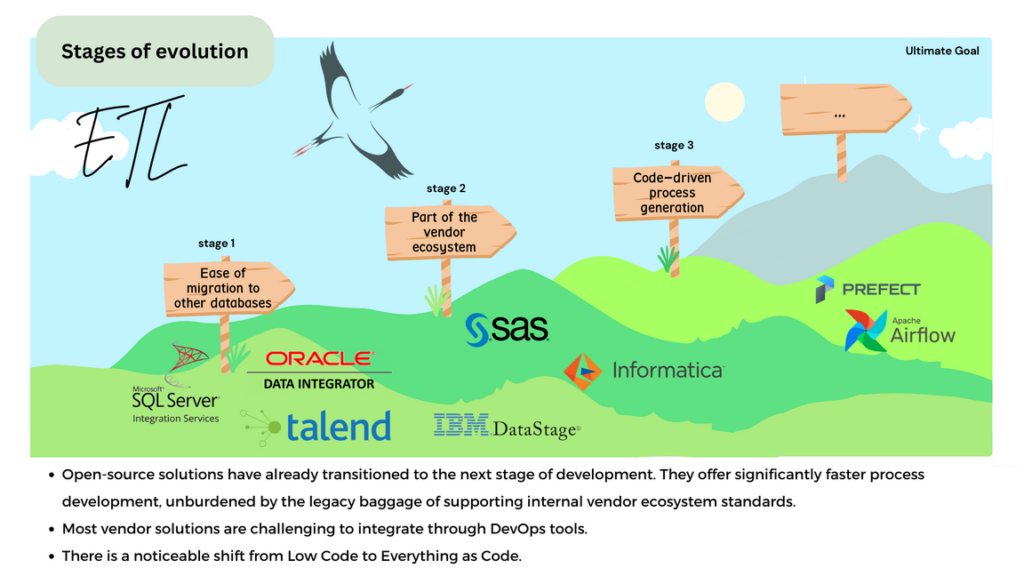
Replacing popular ETL systems like Informatica, IBM Data Stage, and SAS with open source solutions such as Apache Airflow, Prefect, and Luigi can be a more flexible and budget-friendly alternative, bringing its own advantages:
- Ease of migration to other databases. Open source ETL solutions typically match or even surpass vendor solutions in terms of migration simplicity.
- Freedom from vendor ecosystem dependency. Some vendor solutions have become part of their own ecosystem. While this allows solving multiple connected tasks with a single solution, it hinders these solutions’ development, as they are required to adhere to their own standards.
Code-driven process generation. Open source solutions have transitioned to the next stage of their evolution, offering significantly faster process development without the burden of vendor standards.

Tools like dbt, FlyWay, AirByte significantly simplify the implementation and evolution of ETL, addressing specific niche tasks. It helps to avoid reinventing the wheel. Open source solutions may be considered a new stage in the ETL tools evolution:
Initial ETL tools were solely responsible for moving data from one point to another and transforming it “on the way,” creating additional load either for the source system or the ETL itself.
The next step in evolution was transferring transformation logic directly to the DWH, which de facto replaced ETL with ELT (Extract – Load – Transform). This allowed separating data delivery processes from transformation processes, significantly reducing computational requirements for ETL subsystems.
In open source tools, development speed is generally higher, thanks to the shift from Low Code to Everything as a code. This also simplifies processes by enabling code generation with code. Open source tools also integrate more smoothly into CI/CD processes, making it faster and easier to transfer updates between development, testing, and production environments.
DQ.
Migration from vendor-specific DQ solutions like Informatica DQ and SAS DQ to open source alternatives such as Great Expectations, Soda Core, Talend, and Deequ depends on your data quality control needs and error detection requirements. Often, companies chose developing custom DQ solutions, which can be a cost-effective option if there is a necessity solely to perform checks and monitor their results. When choosing an open source DQ alternative, it’s essential to consider that:
The maximum utility of DQ processes is achieved only with a comprehensive response to identified incidents.
It is necessary not only to conduct data quality checks but also to establish processes for responding to identified discrepancies.
DQ control solutions differ in specialization and capabilities. Often, companies start using DQ tools for the needs of other processes (for example, for Data Scientists). Only later they realize that the existing functionality does not meet the requirements for DQ in the DWH organization.

BI reporting tools and self-service analysis tools.
Migration from BI platforms like Tableau, Qlik, Microstrategy, and PowerBI to open source solutions such as Apache Superset, Redash, and Grafana can provide flexibility but requires adaptation period and investments in your own IT personnel. Open source solutions are highly mature and can be a flexible alternative to vendor BI platforms. However, it’s crucial to understand that they may require additional customization to fit the specifics of your organization. Vendor solutions still hold the leadership in this field, but open source solutions are evolving and gradually narrowing the gap. Currently, this gap does not appear critical, especially taking in account the considerable cost of full-fledged vendor solutions.
It’s important to remember that open source alternatives may not fully replace the functionality of paid counterparts and may have a higher entry barrier. Nevertheless, with the thoughtful approach and analysis, migration to open source BI solutions for DWH tasks can be quite advantageous, reducing vendor lock and enhancing flexibility.

How to your perfect open source software?
It’s crucial to understand that choosing the right tool is an investment in the future, as selecting the right tool from the start can lead to cost savings in the long run. When assisting our partners in decision-making, we use a simple and understandable method that helps quickly and effectively identify the open source alternative that suits your company the best. You will need to go through 6 steps:
Define the analysis criteria. Determine non-functional requirements, such as integration with various data sources, the ability to create custom queries and analytical calculations, access control separation, and others.
Identify the key features. Identify the most important features necessary for your company. Either rank criteria by importance or create your own scoring system.
Compile a list of available open source solutions. Research the market and gather information about available solutions. Form a list of candidates for consideration.
Analyse and determine the pros/cons. Evaluate each solution based on your criteria. This may include advantages and disadvantages, such as active community, integration with other solutions, presence of key functionality, and more.
Weigh all factors. Consider critically important criteria and weigh different features before making a decision.
Compile the results and choose the best option. Make a decision based on the analysis and assessment of each alternative.

To make all these steps, we recommend to use an Excel matrix, where rows represent criteria, and each column represents a software option. Evaluate each alternative for each criterion and determine the best option.

This is just a extract from the comparison matrix that one of our clients used when migrating to open source BI tools. In total, the company evaluated over 10 tools against approximately 120 criteria.
Complexity and Cost of Migration
The complexity and cost of migration to open source alternatives varies by components. DWH migration is typically the most challenging task, requiring significant labor/financial resources and time. ETL migration is more flexible in terms of resources, while BI and DQ migrations are generally less labor-intensive.
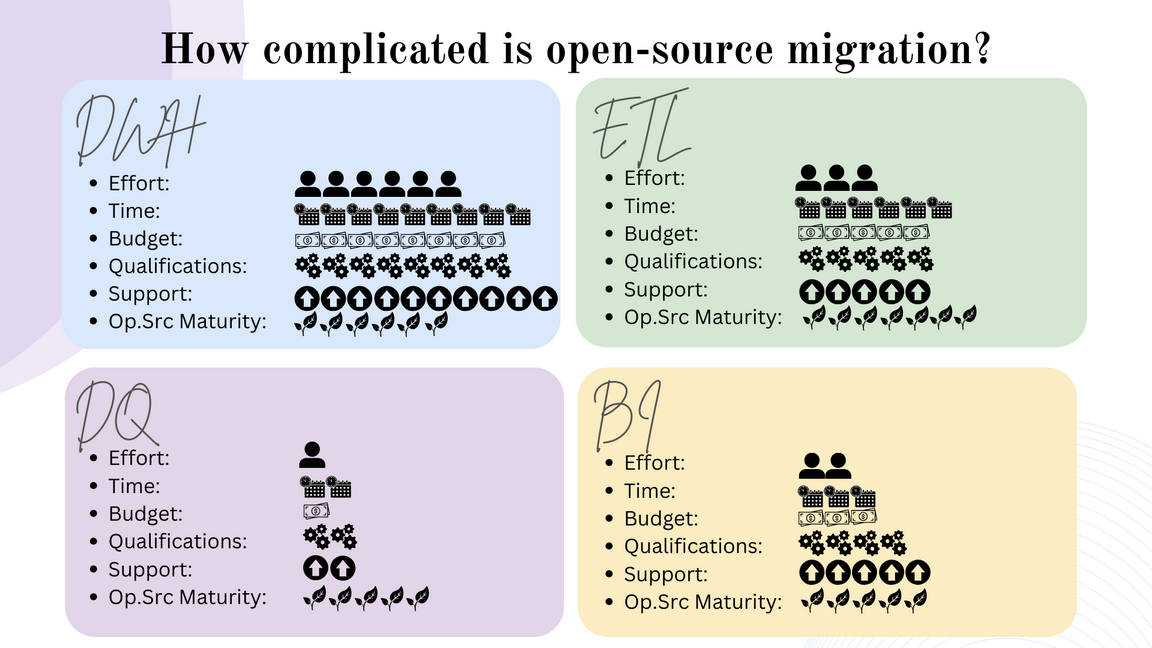
Certainly, for each specific migration case, the cost/duration/labor intensity of the migration will differ depending on business needs and available resources.
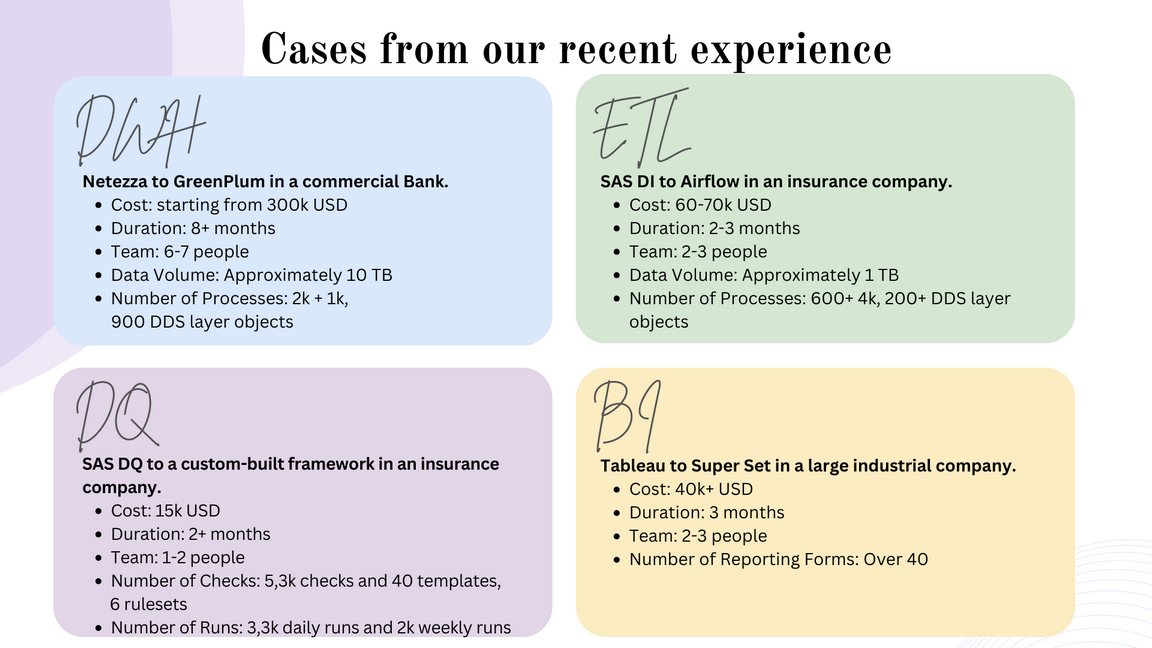
Next, we will take a look at several migration cases from our recent experience. It’s important to understand that in the text below you will encounter averaged values. Your specific situation or the choice of a particular migration tool may influence each factor and thus require a bigger or lesser investments.
DWH. A commercial bank decided to switch its Netezza DWH to GreenPlum. The project was budgeted at around $300 000. The migration process took more than 6 months and involved a team of 7 people. The data volume was approximately 10 terabytes, with over 2 000 processes and 900 objects in the DDS layer. The challenge of this project was that even six months after completion, the bank was reluctant to fully switch to the new DWH. For quite a long time, they operated in both systems, constantly reconciling between them, and for a while the client prioritized data processing on the old architecture.
ETL. An insurance company decided to migrate from SAS Data Integration to Apache Airflow. The project was less costly than the DWH case above, with a budget of around $60 000 – 70 000, and lasted 2-3 months. The team working on the migration consisted of 3 people. In this case, the data volume was approximately 1 terabyte, with over 4 000 processes and 200+ objects in the DDS layer. Clearly, migrating an ETL system to an open source solution proved to be less resource-intensive primarily due to the ability to template processes.
DQ. An insurance company decided to migrate from its SAS Data Quality system to an custom DQ framework. The project budget was approximately $15,000 and lasted just over 2 months. The team consisted of 2 people. During the migration, more than 5 000 checks, 40 templates, and 6 rulesets were implemented, with daily and weekly runs. The migration also benefited the company, which was not prepared for the SAS DQ approach that requires a complete data upload into the DQ system, significantly slowing down processes with vast data volumes.
BI. A large industrial company transitioned from Tableau to Apache Superset. The project cost around $40 000 and took 3 months. The team consisted of 3 people, and over 40 reporting forms were created. It’s essential to understand that the migration went smoothly, not least because the reports were relatively simple, and Superset had all the necessary functionality for their implementation, eliminating the need for additional report customization.
All these cases demonstrate the diversity in migrating to open source alternatives. They emphasize the importance of adapting the strategy to the specific needs and resources of the company. However, the results of these migrations indicate that with proper planning and support, open source solutions can effectively integrate into the business processes of companies of various sizes and profiles.

Open Source myths and misconceptions
- Free but CAPEX -> OPEX. Open source solutions may be free but require investments in management, support, and development, leading to increased operational expenses while reducing capital expenses.
- No vendor lock, but IT Staff lock. Migration to open source may free you from vendor-imposed constraints but could increase dependence on your IT specialists.
- Customizable but… requires a strong IT team. Customization of open source solutions demands qualified specialists, which is not a myth. However, with competent in-house experts, you can still save more than you would otherwise spend on licenses.
- Insufficient maturity, but closer to innovation: Open source solutions might be less mature in certain areas, yet they often contribute to innovation and development. In some domains, such as ETL, open source solutions may even outpace vendor offerings.
Conclusions and Practical Recommendations
Migration to open source alternatives for data warehousing can be a step into the future, bringing significant benefits to companies of various scales and industries. However, for the successful implementation of this process, it is essential to consider several crucial points:
- Selection of open source software. Determine which components of the DWH you are willing to migrate to open source. Explore the market of open source solutions and choose those that best align with your needs and business objectives.
- Analysis of Workload. Examine the complexity of migration for each component and develop a migration plan. Keep in mind that migrating a DWH may require substantial resources, while the migration of DQ systems might be less complex.
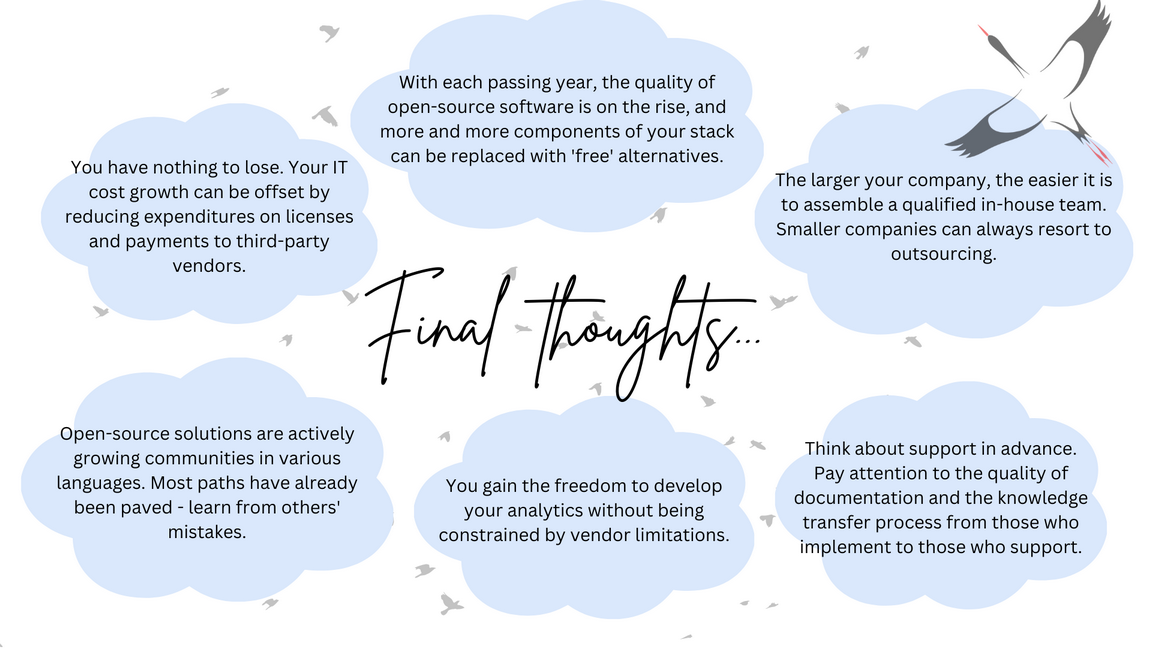
- Training and Staffing. Provide training for employees and establish a support system for addressing potential issues. Remember that open source solutions often have communities that can offer support and solutions. Companies with large budgets can form their own teams, while smaller companies may turn to outsourcing.
- Preparation for Implementation. Prepare for possible downtime and disruptions during the initial stages of the migration. Develop an implementation strategy and a backup plan.
Support and Collaboration. Do not forget to prepare the support service for the period after the transition and pay serious attention to technical documentation during the migration process. It is crucial to have a reliable technical support mechanism and regular updates. The quality of internal documentation will help mitigate IT staff lock risks.
We would like to share even more insights from our experience, but the article is already quite lengthy, and the needs of each business are unique, making it impossible to cover all nuances. As practice shows, an individualized approach is most effective. We are always ready to explore your specific requirements and, based on our expertise, provide you with top notch solutions for data storage, processing, and analysis based on open source software.
Contact us to learn more.